
| Quick Summary Microsoft OneLake is a single, unified data lake that is automatically provisioned for every Microsoft Fabric tenant. Built on Azure Data Lake Storage Gen2, it stores data in open Delta Parquet and Apache Iceberg formats and allows all Fabric workloads, SQL, Spark, Power BI, and others, to access the same data without copying it. |
Most enterprise data estates did not arrive at multiple data lakes by design. Teams needed storage, spun up an Azure Data Lake or S3 bucket, built pipelines into it, and moved on. A year later, the finance team had their lake, the operations team had theirs, and the data engineering team was maintaining pipelines between both. Cross-team analytics became a project, not a query.
Microsoft OneLake, introduced as a core component of Microsoft Fabric, is built to address this directly. One lake per tenant, shared across every Fabric workload, with no data to copy between engines. That is a material architectural shift, but it only pays off if the transition is handled deliberately.
This blog explains what it is, how it compares to a traditional data lake architecture, and what the change actually requires from an organization’s data strategy.

Why Traditional Data Lakes Create the Problem OneLake Is Solving
The scale of the problem is well documented. An IBM Institute for Business Value study of 1,700 chief data officers found that 83% cite data silos as a challenge that hinders innovation and limits real-time analytics. Only 26% are confident their data capabilities could support new AI-enabled revenue streams.
A separate Cloudera study of 1,270 IT leaders across enterprises with more than 1,000 employees, published in April 2026, found that approximately 80% say their AI and data initiatives are constrained by limited data access across environments. Data quality was the most-cited reason AI initiatives fall short, cited by 22% of respondents. Only 18% say their data is fully governed.
The pattern behind these numbers is consistent: organizations created separate data stores for separate purposes, without a unified governance layer connecting them. Each lake is well-managed in isolation. Together, they produce duplication, stale cross-team copies, permission complexity, and analytical queries that require joins across systems no one originally planned to connect.
OneLake is Microsoft’s architectural answer to this. The question for organizations running Microsoft Fabric is whether the answer fits their current environment, and what it takes to get there.
What Is OneLake
OneLake is not a product you purchase separately or a service you configure. Every Microsoft Fabric tenant includes exactly one OneLake instance, provisioned automatically. It cannot be deleted, and organizations cannot create additional instances within a tenant.
Under the hood, OneLake is built on Azure Data Lake Storage (ADLS) Gen2. Data is stored in Delta Parquet or Apache Iceberg formats, open standards that any compatible tool can read, independent of Microsoft. This means data is not locked into a proprietary format: Snowflake can read Delta tables stored in OneLake, and Iceberg-compatible services can consume the same files.
The organizational model works in three levels:
- Tenant: the organization’s OneLake instance. Tenant-wide policies, security, compliance, data management, apply automatically to all data.
- Workspaces: logical containers within the tenant, one per team or domain. Each workspace has its own administrator and is tied to a specific Azure region.
- Data items: lakehouses, warehouses, eventhouses, and other purpose-built storage types within each workspace, each optimized for a specific workload type.
The defining feature is shortcuts: references to data in other locations, another workspace, an ADLS account, Amazon S3, or on-premises sources, that make remote data appear as if it were stored locally in OneLake. Because shortcuts are references and not copies, any change at the source is immediately visible through OneLake without a pipeline run.
OneLake vs Traditional Data Lake: Key Differences
The table below compares the most significant architectural differences between a traditional enterprise data lake (such as an ADLS Gen2 lake built outside Fabric) and OneLake as a Microsoft Fabric component.
| Dimension | Traditional Data Lake | Microsoft OneLake |
| Instance model | One or many lakes per organization; each provisioned and managed separately | One lake per Fabric tenant; automatically provisioned; no additional instances possible |
| Storage format | Any format: Parquet, CSV, JSON, ORC, proprietary, varies by team and tool | Delta Parquet and Apache Iceberg; open standards enforced by default across all Fabric workloads |
| Cross-engine data access | Copy required: data moves from lake to warehouse, or from one lake to another, to serve different engines | No copy required: SQL, Spark, Power BI Direct Lake, and other Fabric engines all read the same OneLake data in place |
| External data access | Pipelines required to ingest from external sources; copies created at ingestion | Shortcuts reference external sources (ADLS, S3, Dataverse, on-premises) without copying; changes at source are immediately visible |
| Governance model | Governance applied per lake, often inconsistently across teams; cross-lake lineage requires custom tooling | Unified catalog with lineage, sensitivity labels, and endorsements across all workspaces; row- and column-level security enforced across all engines |
| Power BI integration | Import or DirectQuery; either requires a copy or a live query on every load | Direct Lake mode: Power BI reads OneLake data directly without copying or importing; updates reflected without a refresh cycle |
| Multi-cloud data | Requires pipelines to ingest or federate; copies at every hop | Shortcuts to S3 and S3-compatible storage federate without ingest; Iceberg/Delta interoperability across Snowflake and others via metadata virtualization |
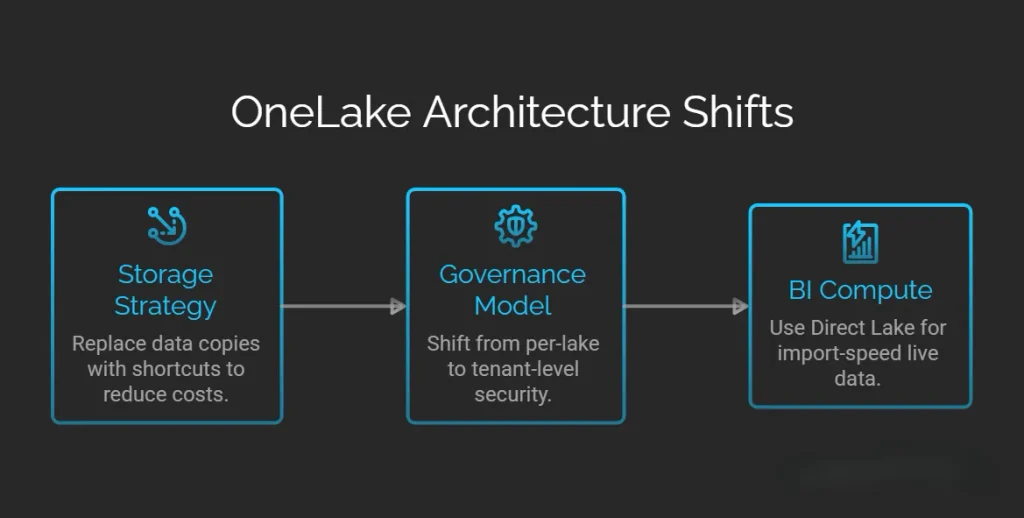
Three Architecture Decisions OneLake Changes
1. Storage strategy: from copies to shortcuts
In a traditional multi-lake environment, moving data between teams means pipelines: extract from the source lake, transform, load into the destination. Each copy introduces latency, storage cost, and a new data quality risk, the destination may not reflect the latest source state.
Shortcuts replace most of these pipelines for read access. A finance workspace can reference the operations team’s data through a shortcut and query it directly, without a copy being created. This changes the storage cost model, fewer copies means less storage, and reduces the pipeline maintenance burden significantly.
2. Governance: from per-lake to per-tenant
In a fragmented lake environment, governance is applied independently to each lake, with no unified view of who can access what across the estate. OneLake enforces security at the tenant level, sensitivity labels, row- and column-level permissions, and data loss prevention (DLP) policies all apply across every workspace and data item, governed centrally. Data Semantics’ Data Governance and Quality service helps organizations design those governance policies before migration, a critical step, because permissions that are not defined before OneLake adoption become a remediation project after.
3. BI compute: from import to Direct Lake
Power BI traditionally required data to be imported (a full copy into a compressed in-memory model) or queried live via DirectQuery (slower, full query on every load). OneLake’s Direct Lake mode changes this: Power BI reads the Delta Parquet files in OneLake directly, without importing and without issuing a live query on every load. The result is import-speed performance on live data, without the refresh cycle. For organizations where BI models are refreshed hourly or daily, this removes a significant operational overhead. Data Semantics’ Business Intelligence and Analytics practice works with this model directly, building semantic layers and Power BI solutions on top of OneLake-native data items.
What Does Not Change: The Work That Still Falls to You
OneLake eliminates a category of infrastructure problems. It does not eliminate the data problems underneath them.
The same issues that made multi-lake governance difficult, inconsistent business term definitions, duplicate records across source systems, undocumented column semantics, permissions that were never designed at scale, migrate into OneLake unless they are resolved first. A shortcuts reference to a poorly governed external lake is a window onto a governance problem, not a solution to one.
Three areas still require deliberate investment regardless of OneLake adoption:
Semantic alignment
OneLake stores data in one place. It does not define what that data means. Business terms, ‘customer,’ ‘revenue,’ ‘order,’ ‘region’, must still be mapped consistently across source systems, or queries across workspaces will return different answers depending on which workspace’s definition is applied. A semantic layer and ontology sit above OneLake and govern meaning; without them, unified storage does not produce unified analytics.
Data quality at source
Shortcuts make it easy to reference data from multiple sources. They also make it easy to surface data quality problems at scale. Duplicate records, incorrect field values, and missing keys that were previously contained within one team’s lake can now propagate to every workspace that shortcuts to that source. Quality must be addressed at the source, not managed as a retrieval problem.
AI readiness
Organizations moving to OneLake as part of a broader AI or Copilot initiative need to verify that their OneLake data is formatted, documented, and permissioned correctly for AI consumption. Only 18% of enterprise IT leaders describe their data as fully governed. OneLake provides the infrastructure; the governance layer is an organizational and architectural investment that OneLake alone cannot provide.
How Data Semantics Helps Organizations Move to OneLake
Forrester named Microsoft a Leader in The Forrester Wave: Data Fabric Platforms, Q4 2025, with the highest scores in Current Offering and Strategy, the first time Microsoft participated fully in the Wave. For organizations already on the Microsoft stack, OneLake and Microsoft Fabric represent the natural consolidation point for their analytics estate. The question is not whether to move, but how to move without inheriting the data quality and governance problems of the previous architecture.
Data Semantics works with organizations at each stage of this transition. The Data Platform Modernization service covers the full migration path: source assessment, workspace and domain design for OneLake, semantic layer and ontology build, pipeline rationalization, and governance policy design. The approach is documented in Data Semantics’ Microsoft Fabric case study, which covers a migration from a fragmented lake architecture to a unified Microsoft Fabric and OneLake estate.
The right starting point is a data assessment: an audit of the current lake estate, a mapping of which workloads migrate cleanly to OneLake versus which require additional preparation, and a governance design before migration begins. Organizations that migrate first and govern later consistently spend more and move slower than those that do it in the right order.
Frequently Asked Questions
Can OneLake replace an existing Azure Data Lake Storage account?
OneLake is built on ADLS Gen2 and exposes the same APIs and SDK surface, workspaces appear as containers and data items appear as folders, so existing ADLS-compatible tools work without modification. For data already stored in an ADLS Gen2 account outside Fabric, the most common approach is to create a shortcut from OneLake to the external ADLS account rather than migrating the data immediately. This gives Fabric workloads access to the existing data while the migration and governance work proceeds in parallel. Full migration, bringing the data into OneLake natively, makes sense for data that will be actively governed and queried through Fabric workloads, particularly where Direct Lake mode in Power BI is part of the design. Data that is archival or infrequently accessed is often better served by a shortcut reference than a migration.
Does OneLake work with non-Microsoft data platforms like Snowflake or Databricks?
Yes, through two mechanisms. First, Delta tables stored in OneLake are readable by Iceberg-compatible services, including Snowflake, through metadata virtualization, Snowflake can query OneLake data without a copy being created. Second, shortcuts from OneLake can reference S3-compatible storage that other platforms also read, creating a federated access pattern rather than a full migration. For organizations running Databricks alongside Microsoft Fabric, Unity Catalog and OneLake can coexist, with data accessed through shortcuts or mirroring depending on the use case. Data Semantics has experience designing multi-platform architectures where OneLake is the central governance layer without requiring organizations to abandon existing Databricks or Snowflake investments.
| Book a Data Assessment Moving to OneLake is an infrastructure change and a data strategy decision. Data Semantics can audit your current lake environment, design the OneLake workspace and governance model that fits your organization, and manage the migration. Book a data assessment to understand what your transition involves |