If you are a CTO, CDO, or IT Director staring down an ERP replacement project, you already know the stakes. Your ERP touches finance, inventory, procurement, and payroll all at once, so a bad cutover does not just create a technical headache. It stalls invoicing, breaks reporting, and puts your credibility with the board on the line.
This guide walks you through what ERP migration involves, why so many teams struggle with it, and how to plan an ERP data migration that goes live without the drama. You will get a practical framework you can take into your next planning meeting, not just theory.
Table of Contents
What is ERP Migration?
ERP migration is the process of moving your enterprise resource planning system, and the data that lives inside it, from one platform or environment to another. That could mean moving from an on-premises system to the cloud, switching vendors entirely (say, from a legacy homegrown system to SAP or NetSuite), or upgrading to a new version of your current platform.
At the center of every ERP migration is ERP data migration: extracting master data, transactional records, and configuration settings from the old system, cleaning and transforming that data, and loading it into the new environment without breaking the business processes that depend on it. Get the data migration wrong, and the rest of the project, however well designed, will not hold up.
It helps to separate the two terms your team will hear constantly during planning:
- ERP system migration refers to the entire initiative: infrastructure, integrations, workflows, user training, and go-live.
- ERP data migration refers specifically to the movement and validation of the data itself, usually the highest-risk piece of the whole project.
Why Businesses are Migrating to Cloud ERP
Cloud ERP has moved from “nice to have” to the default choice for new deployments. Most organizations evaluating a new ERP today start the conversation with cloud, not on-premises, because the operating model simply fits how modern businesses run: distributed teams, remote access, and a need to scale up or down without a hardware procurement cycle.
Vendor end-of-life deadlines are accelerating that shift further, forcing organizations running older on-premises platforms to decide between a costly re-implementation on aging infrastructure or a move to the cloud.
The business drivers behind the shift
- Lower infrastructure overhead: No more managing servers, patching, or planning hardware refresh cycles.
- Faster access to innovation: Cloud vendors ship AI-driven forecasting, automation, and analytics updates continuously, instead of waiting for a multi-year upgrade cycle.
- Scalability: Cloud ERP flexes with seasonal demand, new business units, or M&A activity without a hardware procurement cycle.
- Better data accessibility: Cloud-native ERPs typically integrate more easily with modern BI and reporting tools, which matters if your team is trying to move away from static spreadsheets and toward real-time dashboards.
If your ERP migration is really the first step of a broader move toward a modern data stack, it is worth looking at this alongside your app and data modernization roadmap so the ERP project does not end up as an isolated cloud silo.
Common Challenges with ERP Data Migration
Most ERP projects do not fail because the new software is bad. They fail because the data underneath it was never ready to move. Gartner has found that by 2027, 70% of ERP implementations will fall short of their original business case, and more broadly, data migration projects have a long track record of running over time or over budget.
1. Dirty, duplicate, or incomplete master data
Years of manual entry, mergers, and one-off fixes leave most legacy ERPs full of duplicate vendor records, inconsistent naming conventions, and missing fields. Migrating that data as-is just moves the mess into your new system.
2. Underestimating data volume and complexity
Transactional history, custom fields, attachments, and years of audit trails add up fast. Teams that scope the migration around “core” master data often get blindsided by how much legacy data needs a home.
3. Integration and dependency gaps
Your ERP rarely operates alone. CRM, warehouse management, EDI, and BI tools all depend on data flowing in and out of it. Migrating the ERP without mapping every downstream dependency is one of the most common causes of post-go-live outages.
4. Lack of a rollback and validation plan
Teams under deadline pressure often skip a proper reconciliation step, comparing record counts, balances, and key fields between the old and new systems before cutover. Without it, errors surface only after the business is already live on the new platform.
5. Change management and user adoption
Even a technically flawless migration fails in practice if finance, procurement, and operations teams do not trust or know how to use the new system on day one.
Read More: For a broader look at how these same challenges play out across cloud, warehouse, and platform migrations (not just ERP), see our Ultimate Guide to Data Platform Migration.
Types of ERP Migration
Not every ERP migration looks the same. Knowing which type you are running shapes your timeline, budget, and risk profile.
Platform migration
Moving from one ERP vendor to a completely different one, for example, from a legacy on-premises system to SAP S/4HANA, Oracle Cloud, or Microsoft Dynamics 365. This is the highest-effort, highest-risk category, since data structures, business logic, and workflows rarely map one to one.
Version or upgrade migration
Moving from an older version of your current ERP to a newer one, such as SAP ECC to S/4HANA. Data structures are usually more similar, but customizations and legacy configurations can still create friction.
On-premises to cloud migration
Rehosting or re-architecting an existing ERP into a cloud environment, often the fastest-growing category given vendor support deadlines and infrastructure cost pressure.
Phased or hybrid migration
Running the old and new systems in parallel and migrating modules, business units, or regions in stages rather than a single “big bang” cutover. This reduces risk but extends the overall timeline and requires careful interim integration.
Benefits of ERP Data Migration
Done well, ERP data migration is not just a technical exercise. It is an opportunity to reset your data foundation.
- Cleaner, more trustworthy data. Migration forces a data quality audit you might otherwise never schedule, removing duplicates and standardizing formats across the business.
- Faster, more accurate reporting. Consolidated, clean data flows more easily into dashboards and forecasting tools, which is a natural extension of your business intelligence and visualization capability.
- Reduced operational risk. Retiring unsupported legacy systems removes a growing source of security and compliance exposure.
- Lower total cost of ownership. Cloud ERP typically reduces infrastructure spend and shifts maintenance effort to the vendor.
- A foundation for automation and AI. Clean, well-structured ERP data is the prerequisite for AI-driven forecasting, anomaly detection, and process automation down the line.
To know more benefits, read 10 Benefits of Data Migration and Why They Matter for Your Business
How to Build an ERP Migration: Key Steps for Planning
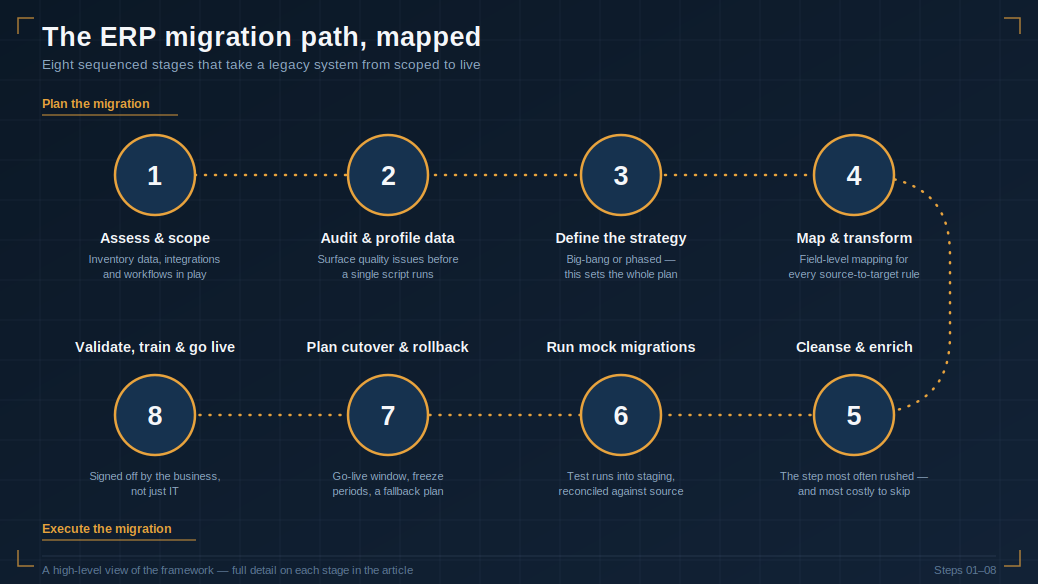
A clean cutover comes from sequencing, not luck. Here is the step-by-step framework we use with clients planning an ERP system migration.
Step 1: Assess and scope
Map out every data object, integration, and custom workflow tied to your current ERP. Define what “done” looks like, which modules, business units, and data types are actually in scope for this migration.
Step 2: Audit and profile your data
Run a data quality assessment against your legacy system before you write a single migration script. Identify duplicates, orphaned records, missing mandatory fields, and inconsistent formatting.
Step 3: Define your migration strategy
Decide between a big-bang cutover (all at once) or a phased approach (module by module or region by region). This decision drives your entire project timeline and resourcing plan.
Step 4: Build your data mapping and transformation rules
Map every field from the source system to its destination in the new ERP, and document transformation rules for anything that does not map directly, currency conversions, unit standardization, or merged fields.
Step 5: Cleanse and enrich the data
Deduplicate records, standardize formats, and fill critical gaps before migration, not after. This is the step most often rushed, and the one most responsible for post-go-live firefighting when it is skipped.
Step 6: Run mock migrations and reconcile results
Execute at least two or three full test migrations into a staging environment. Reconcile record counts, financial balances, and key transactional data against the source system after each run.
Step 7: Plan the cutover and rollback path
Define your go-live window, freeze periods for the legacy system, and a documented rollback plan in case validation fails post-cutover.
Step 8: Validate, train, and go live
Confirm data integrity with business stakeholders, not just IT, before flipping the switch. Pair go-live with role-specific training so finance, procurement, and operations teams are ready on day one.
Best Practices for a Successful ERP Data Migration
The steps above tell you what to do. These best practices are about how to do it well, the habits that separate teams who hit a clean cutover from teams who spend the first quarter post-go-live fixing avoidable data issues.
- Start data cleansing early, not during the migration window. Data quality work done six months out is far cheaper than data quality work done the week before go-live.
- Treat data migration as its own workstream, with its own budget, timeline, and owner, rather than a line item inside the broader ERP project plan.
- Migrate in waves where possible. A phased approach limits the blast radius if something goes wrong and gives your team room to course-correct.
- Automate validation and reconciliation. Manual spot-checks do not scale to millions of records; automated reconciliation scripts catch discrepancies your team would otherwise miss.
- Keep the legacy system read-only, not deleted, for a defined period post go-live. This gives you a safety net for reconciliation and audit purposes.
- Involve business users in UAT, not just IT. The people who will use the data daily are the best judges of whether it looks right.
- Document everything. Field mappings, transformation logic, and validation results should be documented well enough that someone outside the original project team could pick up where you left off.
Conclusion
ERP migration is rarely about the software itself. The platforms you are evaluating, whether SAP, Oracle, Microsoft Dynamics, or NetSuite, are all mature, capable systems. What determines success is how disciplined you are about the data underneath: how early you start cleansing it, how rigorously you validate it, and how clearly you plan for the handful of things that will inevitably go wrong during cutover.
Treat ERP data migration as its own project, staffed and budgeted accordingly, and you dramatically shift the odds in your favor. Treat it as an afterthought, and you become one more data point in the failure statistics.
If your team is planning an ERP migration and wants a second set of eyes on your data strategy, book a migration assessment with DataPrep360. We will help you scope the data risk before it becomes a go-live problem.
Make sure to also schedule a demo with our data migration team.
FAQs
How long does an ERP data migration typically take?
Timelines vary widely with data volume and complexity, but most mid-sized ERP migrations run 6 to 12 months from assessment through go-live, while large, multi-region deployments can take 18 months or longer.
What is the biggest risk in ERP data migration?
Poor data quality in the source system is consistently the top risk. Duplicate records, missing fields, and inconsistent formatting cause far more go-live problems than the migration tooling itself.
Should we migrate all our historical data, or only active records?
Most organizations are better served migrating a defined window of active, relevant data (commonly 2 to 3 years) and archiving older historical records separately rather than dragging every legacy record into the new system.
What is the difference between ERP migration and ERP implementation?
ERP implementation refers to configuring and deploying the new software itself. ERP migration specifically covers moving your existing data and processes into that new environment, and it is usually the more time-consuming and risk-heavy part of the project.
Do we need a dedicated data migration team, or can our ERP implementation partner handle it?
Many ERP implementation partners handle basic data loading, but dedicated data migration expertise, focused on data quality, mapping, and validation, significantly reduces the risk of the issues covered in this guide, especially for complex or multi-source environments.
How do we know if our ERP migration was successful?
Success is measured by more than a completed go-live. Look at reconciliation accuracy against the source system, the number of post-go-live data issues reported by business users, and whether reporting and downstream integrations are functioning correctly within the first 30 to 60 days.